
Upgrade Your Authentication Flow to OAuth 2.0
This guide helps you upgrade your Kiteworks API integration from a deprecated authentication flow — Signature or User Credentials — to a supported OAuth 2.0 flow. To upgrade, update the client registration in Admin UI and update your token-acquisition code.
Prerequisites
Admin access to Kiteworks Admin UI
You must have permission to edit client application settings under Application Setup → Apps and Plugins.
Your existing client_id and client_secret
These carry over to the new flow unchanged. You only need to regenerate the secret if it was previously exposed.
For JWT Assertion: an RSA key pair (optional)
You can generate a key pair directly in Admin UI or upload your own PEM-encoded public key. Only required if you are upgrading to JWT Assertion.
Who Is Affected
This guide applies to integrations using the Signature flow (HMAC-based) or the User Credentials flow (grant_type=password).
Which Flow Should I Use?
Choose your target flow based on how your application operates:
| Use Case | Recommended Flow | Reason |
|---|---|---|
| User logs in via browser / user-initiated workflow | Authorization Code Flow (shown as Connect (Authorization Code) in Admin UI) | User authenticates in browser; your application never handles their credentials |
| Automated / server-to-server (machine-to-machine) | JSON Web Token (JWT) Assertion | Requires no user interaction; secure for trusted server environments |
Step 1 — Identify Your Current Flow
Signature Flow
The Signature flow uses a time-based Hash-based Message Authentication Code (HMAC) signature computed from client_id + client_secret + timestamp. No user account is associated; activity does not appear in audit logs. Kiteworks removed the Signature flow from Admin UI registration in version 9.1.
To identify: In Admin UI → Application Setup → Apps and Plugins → API, the client's registered flow shows as "Signature." In your code, look for HMAC signature construction — typically a string like:
import hmac, hashlib, time

timestamp = str(int(time.time()))
message   = client_id + client_secret + timestamp
sig       = hmac.new(client_secret.encode(), message.encode(), hashlib.sha256).hexdigest()
User Credentials Flow
The User Credentials flow (OAuth 2.0 Resource Owner Password Credential) submits a username and password directly in the token request body. Kiteworks removed the User Credentials flow from Admin UI in version 9.0.
To identify: Look for grant_type=password in token requests:
curl -s -X POST "https://your-instance.kiteworks.com/oauth/token" \
  -d "grant_type=password&username=user@example.com&password=SECRET&client_id=MY_APP&client_secret=MY_SECRET"
Step 2 — Register the New Flow in Admin UI
Before changing your code, update the client's registered flow in Admin UI. Steps 1–4 apply to both flows; step 5 depends on which flow you're upgrading to.
-
Open the API clients settingsNavigate to Admin UI → Application Setup → Apps and Plugins → API.
-
Select your client applicationChoose the application your integration uses.
-
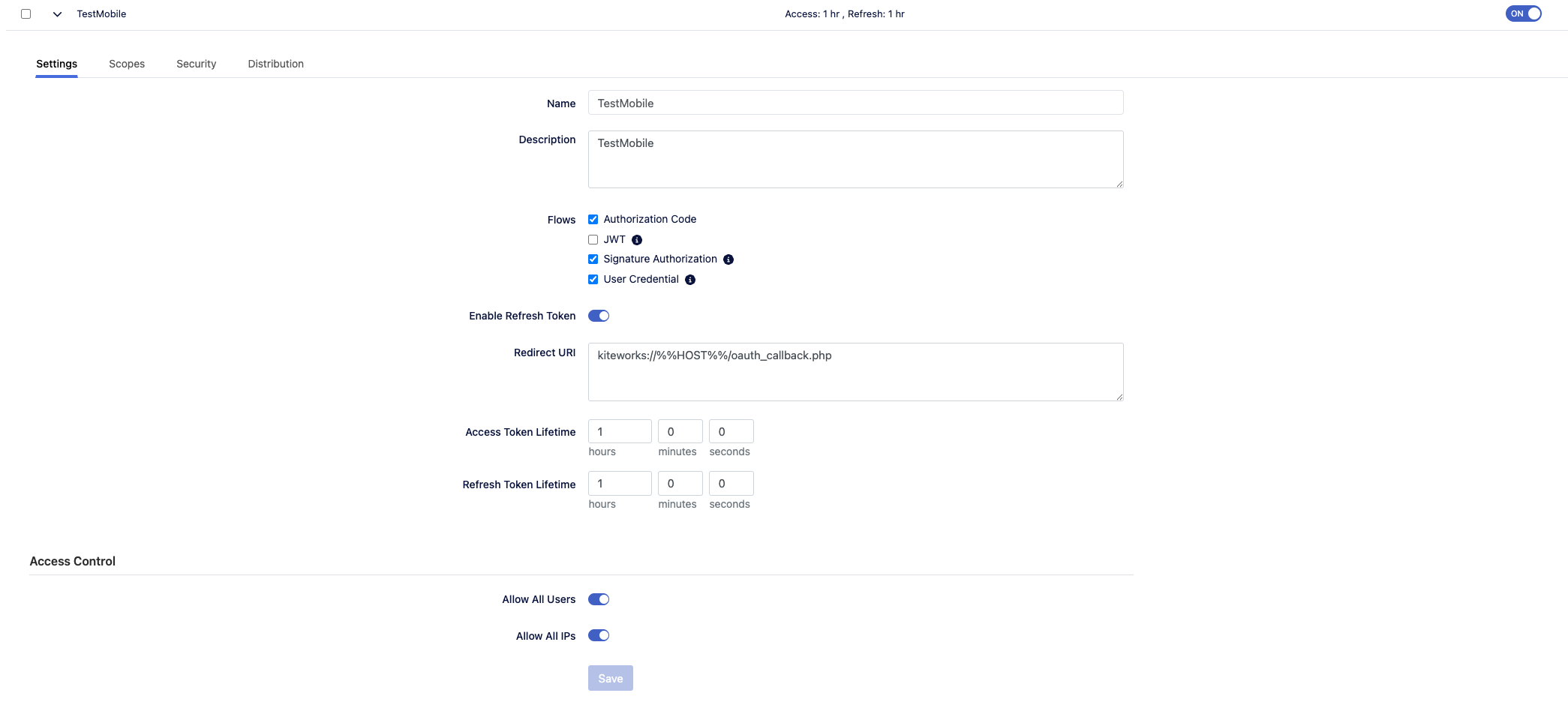
Open the Flows tabGo to Settings → Flows.
-
Select the new flowChange the flow to Connect (Authorization Code) or JWT Assertion depending on your use case.
If upgrading to Authorization Code Flow:
-
Configure the Redirect URISet the Redirect URI to the HTTPS callback URL your application handles after login — for example,
https://your-app.example.com/callback. Your application must serve an endpoint at this URL to receive the authorization code.
If upgrading to JWT Assertion:
-
Configure the RSA key pairUpload or generate an RSA key pair; note the UID attribute (determines the user to impersonate — typically
email).
Step 3A — Implement Authorization Code Flow
To implement the Authorization Code Flow (RFC 6749 §4.1), complete the following steps. The user authenticates at the Kiteworks login page; your application exchanges the returned authorization code for an access token.
-
Redirect the user to the authorization endpointStart the flow with the required
client_id,redirect_uri,response_type=code, andstateparameters. -
Receive the authorization codeAfter login, Kiteworks redirects to your
redirect_uriwith acodeandstateparameter. -
Exchange the code for tokensVerify the
stateparameter matches the value you set when starting the flow (Cross-Site Request Forgery (CSRF) protection), then POST to the token endpoint to exchange the code for tokens. -
Attach required headers to all API requestsUse
Authorization: Bearer <access_token>andX-Accellion-Version: 28on all API requests. -
Refresh tokens before expiryUse the refresh token to obtain new access tokens before they expire.
Endpoints:
- Authorization endpoint:
GET {KW_BASE_URL}/oauth/authorize - Token endpoint:
POST {KW_BASE_URL}/oauth/token
Token exchange:
# Exchange authorization code for tokens
curl -s -X POST "https://your-instance.kiteworks.com/oauth/token" \
  -H "Content-Type: application/x-www-form-urlencoded" \
  -d "grant_type=authorization_code" \
  -d "code=AUTHORIZATION_CODE" \
  -d "redirect_uri=https://your-app.example.com/callback" \
  -d "client_id=YOUR_CLIENT_ID" \
-d "client_secret=YOUR_CLIENT_SECRET"import requests
# AUTHORIZATION_CODE comes from the ?code= query parameter in the redirect
# In Flask: AUTHORIZATION_CODE = request.args.get("code")
# In Django: AUTHORIZATION_CODE = request.GET.get("code")
AUTHORIZATION_CODE = "YOUR_AUTHORIZATION_CODE" # replace with actual value from redirect
token_url = "https://your-instance.kiteworks.com/oauth/token"
data = {
"grant_type": "authorization_code",
"code": AUTHORIZATION_CODE,
"redirect_uri": "https://your-app.example.com/callback",
"client_id": CLIENT_ID,
"client_secret": CLIENT_SECRET,
}
resp = requests.post(token_url, data=data)
tokens = resp.json()
access_token = tokens["access_token"]
refresh_token = tokens["refresh_token"]Refresh token:
curl -s -X POST "https://your-instance.kiteworks.com/oauth/token" \
  -H "Content-Type: application/x-www-form-urlencoded" \
  -d "grant_type=refresh_token" \
  -d "refresh_token=REFRESH_TOKEN" \
  -d "client_id=YOUR_CLIENT_ID" \
-d "client_secret=YOUR_CLIENT_SECRET"import requests
token_url = "https://your-instance.kiteworks.com/oauth/token"
data = {
"grant_type": "refresh_token",
"refresh_token": current_refresh_token, # the token stored from the previous response
"client_id": CLIENT_ID,
"client_secret": CLIENT_SECRET,
}
resp = requests.post(token_url, data=data)
tokens = resp.json()
new_access_token = tokens["access_token"]
new_refresh_token = tokens["refresh_token"] # replace stored token with this valueFor a complete Python implementation including the browser redirect and callback server, see Authentication → Authorization Code flow.
Step 3B — Implement JWT Assertion Flow
The JWT Assertion flow is the OAuth 2.0 JWT Bearer token grant (RFC 7523). It requires no user interaction — your application constructs a signed JWT and exchanges it for an access token.
| Claim | Description | Example |
|---|---|---|
iss |
Issuer — your client_id |
my_app_client_id |
sub |
Subject — email of the Kiteworks user to impersonate | user@example.com |
aud |
Audience — the Kiteworks token endpoint URL | https://kw.example.com/oauth/token |
iat |
Issued-at time (Unix timestamp) | 1712768400 |
exp |
Expiration time (max 5 minutes from iat) |
1712768700 |
jti |
Unique JWT ID (prevents replay attacks) | a3f8c1d2-... |
Signing algorithm: RS256 (RSA with SHA-256). Token endpoint: POST {KW_BASE_URL}/oauth/token
Construct and exchange JWT:
# Generate a signed JWT first (e.g. with step CLI or openssl), then exchange:
curl -s -X POST "https://your-instance.kiteworks.com/oauth/token" \
  -H "Content-Type: application/x-www-form-urlencoded" \
  -d "grant_type=urn:ietf:params:oauth:grant-type:jwt-bearer" \
  -d "assertion=YOUR_SIGNED_JWT" \
-d "client_id=YOUR_CLIENT_ID"# pip install PyJWT requests
import time, uuid, jwt, requests
# Load the RSA private key (PEM format) registered in Admin UI → Apps and Plugins → Flows
PRIVATE_KEY_PEM = open("private_key.pem").read()
CLIENT_ID = "your_client_id"
KW_BASE_URL = "https://your-instance.kiteworks.com"
USER_EMAIL = "user@example.com"
now = int(time.time())
payload = {
"iss": CLIENT_ID,
"sub": USER_EMAIL,
"aud": f"{KW_BASE_URL}/oauth/token",
"iat": now,
"exp": now + 300, # 5 minutes
"jti": str(uuid.uuid4()),
}
assertion = jwt.encode(payload, PRIVATE_KEY_PEM, algorithm="RS256")
resp = requests.post(
f"{KW_BASE_URL}/oauth/token",
data={
"grant_type": "urn:ietf:params:oauth:grant-type:jwt-bearer",
"assertion": assertion,
"client_id": CLIENT_ID,
},
)
access_token = resp.json()["access_token"]For a complete implementation guide, see Authentication → JWT Assertion flow.
Step 4 — Update All API Calls
Regardless of which flow you selected, all API requests must include Authorization: Bearer and the API version header:
curl -s \
  -H "Authorization: Bearer $ACCESS_TOKEN" \
  -H "X-Accellion-Version: 28" \
"https://your-instance.kiteworks.com/rest/folders/top"session = requests.Session()
session.headers.update({
"Authorization": f"Bearer {access_token}",
"X-Accellion-Version": "28",
})
response = session.get(f"{KW_BASE_URL}/rest/folders/top")Frequently Asked Questions
The following questions address common concerns when upgrading authentication flows.
What is the recommended authentication method for Kiteworks API integrations?
Kiteworks recommends OAuth 2.0-based authentication. Use Authorization Code Flow (shown as Connect (Authorization Code) in Admin UI) when a user logs in interactively via a browser. Use JWT Assertion for machine-to-machine automation without user interaction. JWT Assertion is only for use in secure, trusted server environments.
Do I need to regenerate my client secret when upgrading authentication flows?
No. The client secret used in old flows continues to work in the new flows. You only need to regenerate it if it was previously exposed.
Does JWT Assertion return a refresh token?
No. JWT Assertion does not return a refresh token. Generate a new signed JWT and request a new access token when the current token expires.
Can I use JWT Assertion in a public-facing web application?
No. JWT Assertion allows impersonation of Kiteworks users and requires access to an RSA private key. It must only be used in secure, trusted server environments — never in client-side or publicly accessible applications.
What happens to my existing API calls during the upgrade?
Your existing API calls continue to work until you update the client registration in Admin UI. After changing the registered flow, update your code to request tokens using the new flow before deploying.
Next Steps
You've upgraded your authentication flow. Here's what to do next:
- Upgrade to API v28 → Add
X-Accellion-Version: 28to all API requests and apply all v28 breaking changes. - For complete implementation code, see Authentication → Authorization Code Flow → or Authentication → JWT Assertion →.
- API Reference → Explore all available endpoints.